In the initial stage of SEO, it is quite difficult for all to invest in expensive keyword research tools. People find something free that serves their purpose, and there is nothing to be ashamed of. We all have done that, right?
But here is the thing: keyword research has changed quite a bit. With AI search engines like ChatGPT, Perplexity, and Google’s AI Overviews now influencing how people find information, picking the right keywords is not just about ranking on Google anymore. You need to think a little wider than that.
In this blog, I am going to tell you how to do keyword research in 2026 and which free keyword research tools you can use to start your SEO journey.
But First, You Should Know What a Keyword Is.
It is not as complicated as it sounds. You just need a clear process.
Start with a topic first. You can find topic ideas from Reddit threads, YouTube’s autocomplete feature, Google’s “People Also Ask” section, or just by typing a word slowly into Google in incognito mode and watching what suggestions pop up. Those autocomplete suggestions are Google telling you exactly what people are searching for right now — and that is genuinely useful data.
Then use a keyword tool to dig deeper. Once you have a topic, plug it into a keyword research tool and look at these core metrics:
- Search Volume — How many times, on average, people search for that keyword per month. Higher volume means more potential traffic.
- Keyword Difficulty (KD) — How hard it will be for your site to rank on page one. The lower the number, the better your chances.
- Cost Per Click (CPC) — What advertisers pay for a click on that keyword. High CPC often means the keyword has commercial value.
- Search Trends — Whether interest in the keyword is growing, shrinking, or staying steady over time.
You will also want to check search intent — basically, why someone is searching for that term. Is the person looking for information? Comparing products before buying? Ready to purchase? Trying to find a specific website? Matching your content to the right intent matters more than most beginners realise.
Quick tip for beginners: Go after long-tail keywords — phrases with four or more words. “Running shoes” is hard to rank for. “Running shoes for flat feet women” is much more specific, has less competition, and connects you with someone who actually knows what they want. That usually means better engagement and more conversions too.
The Best Free Keyword Research Tools in 2026
Here are the tools worth your time right now.
1. Google Keyword Planner
This is Google’s own keyword tool, and it is free — though you will need a Google Ads account to use it. It was originally built for paid advertising, but it is still useful for SEO if you know how to read it.

You can get monthly search volume estimates, competition levels, CPC ranges, and year-over-year changes. The tool also generates hundreds of keyword ideas quickly based on a seed keyword or your website.

The downside I keep running into: it does not give you precise search volume numbers. Instead of saying a keyword gets 4,500 searches a month, it shows you a range like “1k–10k.” That is fine for running ads, but for SEO purposes, it makes it harder to compare and prioritise keywords properly. For that reason, I would always pair this with another tool.
2. Answer The Public
This is one of my favourite tools — not just because it is free, but because of how it presents data.
Instead of giving you a plain list of keywords, Answer The Public builds visual maps showing all the questions, comparisons, and preposition-based searches related to your topic. So if your keyword is “running shoes,” you get breakdowns like “running shoes for flat feet,” “running shoes vs. trainers,” “best running shoes for beginners” — organised in a way that sparks a lot of content ideas fast.
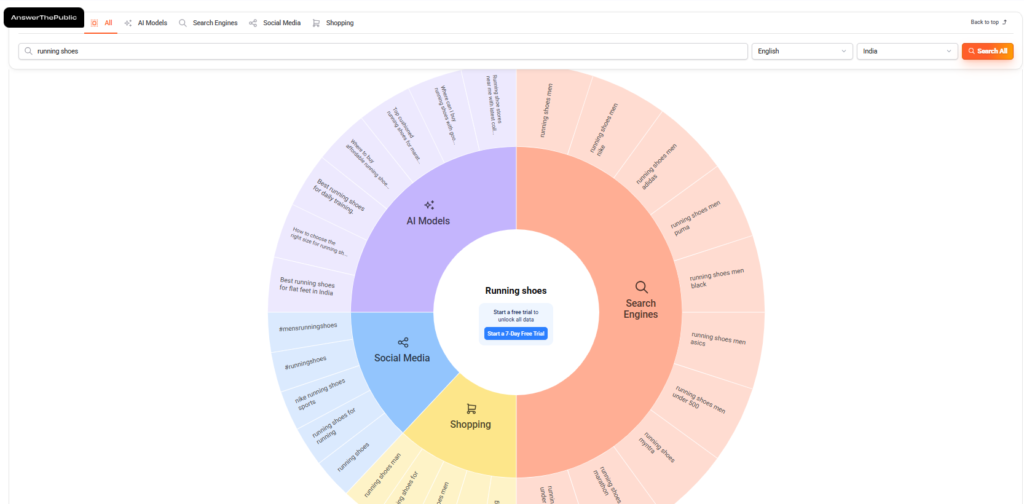
It pulls data from Google, Bing, and YouTube, and it is particularly good for finding question-based keywords — the kind that work well in FAQs, blog posts, and “People Also Ask” answers.
The limitation is the daily search cap on the free plan (3 searches per day per account). My workaround: use multiple Google accounts. Works well enough when you just need to do quick research sessions.
3. Ahrefs
Ahrefs is one of the biggest names in SEO, and their free Keyword Generator tool gives you a solid peek at what their full platform offers.
You can enter a seed keyword and get search volume, keyword difficulty, global search volume, number of clicks per search, and traffic potential. It covers Google, Bing, YouTube, and Amazon — which is useful depending on what you are optimising for.

The catch is that the free version limits you to the top 10 results for most metrics. If you want to go deeper, you will need to pay for one of their plans. But for getting a quick sense of a keyword’s difficulty and volume in your target country, it does the job.
One thing missing in the free version: search intent data. You will not see whether a keyword is informational or transactional, so keep that in mind.
4. Google Trends
Google Trends is free, and a lot of people sleep on it. I think it is genuinely useful — just not as a standalone tool.
It shows you how search interest for a topic has changed over time. You can compare keywords against each other, filter by location, and look at related trending queries. The “Interest over time” graph quickly tells you whether a keyword is growing in popularity, declining, or seasonal.

Where it falls short is that it does not give you actual search volume numbers. So you can see that a keyword is trending upward, but you cannot tell if it gets 500 searches a month or 50,000. That is why I always pair Google Trends with one of the other tools on this list — use it to validate direction, then use something like Keyword Planner or Ahrefs to check the actual numbers.
5. Keyword Intent
This is a completely free tool with a clean, easy-to-use interface — and it has a few features that make it stand out from the others.
First, you can filter your search by type: questions, comparisons, how-tos, ideas, and more. That is handy when you already know what kind of content you want to create and just need the right keywords to match.

Second, there is a language filter. Not many free tools give you that option, but if you are targeting non-English markets or multilingual audiences, it is a genuinely useful feature.
You get standard metrics — search volume, keyword difficulty, CPC — plus a 12-month trend graph. There is no daily search limit either, which is a big plus if you are doing extended keyword research sessions. Overall, this is a solid starting point for beginners.
6. Google Search Console
This one is completely free and, honestly, one of the most underused tools out there. If you have a website already, Google Search Console should be set up before anything else.
What makes it valuable is that it shows you which keywords your pages are already ranking for, how many impressions and clicks you are getting, and where your average position sits for each query. That information is gold. Instead of guessing what might work, you are working with real data from your actual site.
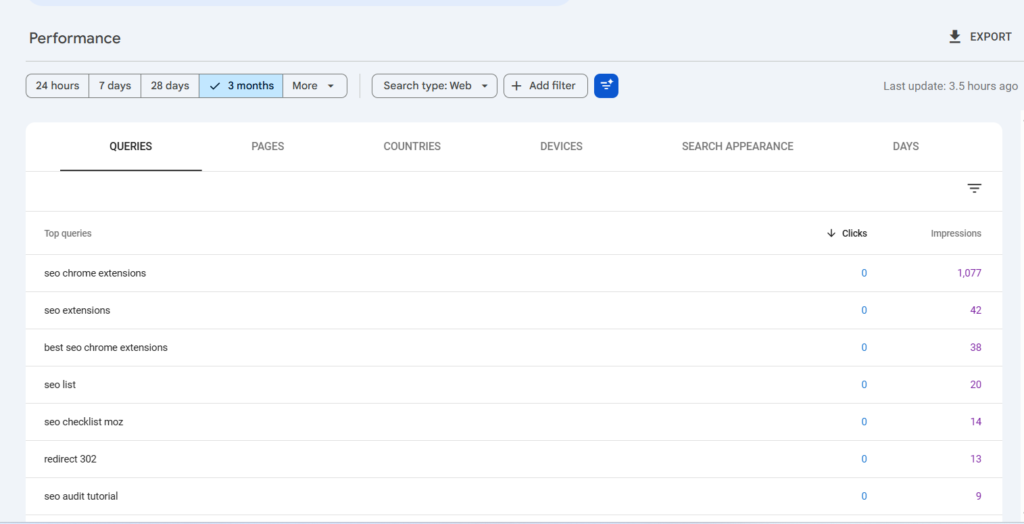
It is not the best for finding brand new keyword ideas from scratch, but for analysing and improving what you are already doing, nothing beats it.
7. Answer Socrates
Think of this as Answer The Public’s newer, more data-heavy cousin. It is completely free and pulls together keyword questions from across Google, including “People Also Ask” results, which are showing up more and more in search results these days.

What I find useful about it is the topic clustering — it groups related questions together, so you get a much clearer picture of the different angles people are taking around your topic. It also pulls in Google Trends data alongside the keyword questions, so you can see whether interest is rising or falling.
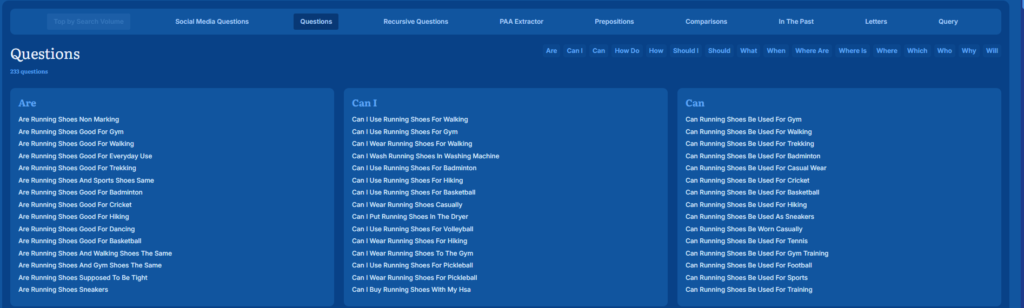
If you are building out a content strategy around question-based keywords, Answer Socrates is worth adding to your regular toolkit.
A Simple Workflow That Actually Works
Rather than picking one tool and sticking to it, here is a simple process that gets better results:
- Google Autocomplete (incognito mode) — Type your topic slowly and note the suggestions. These are real searches people are doing right now.
- Answer The Public or Answer Socrates — Go deeper on question-based keywords and content angles.
- Ahrefs Free Generator or Keyword Intent — Check search volume and keyword difficulty.
- Google Trends — Confirm whether interest in the keyword is growing or fading.
- Google Search Console — For your existing site, always check what keywords you are already close to ranking for. A little optimisation on a page sitting at position 8–15 can get you to page one faster than targeting brand new keywords from scratch.
Using multiple tools together is what gives you an edge. The keyword ideas that competitors miss are usually hiding in the gaps between what individual tools show you.
How Would You Know Which Is The Best Keyword Research Tool?
I have given you a basic idea of the 7 free keyword research tools. They all serve the same purpose of giving you an insight into easy-to-rank keywords with high search volumes and business potential, but differently.
Though it doesn’t provide the data of keyword difficulty, I like to use Answer Your Public the most. The interface is unique, and you get different types of keyword ideas(questions, prepositions, and alphabeticals) related to search queries.
As your site grows and you have data to work with, Google Search Console becomes the most valuable free tool you have. It stops being about guessing what might rank and starts being about improving what is already working.
Keep exploring, cross-reference your data, and do not overthink it. Good keyword research is about consistency more than perfection.