No tech skills needed — if you can click around in WordPress, Wix, or Shopify, you can do 80% of this.
Most people hear ‘technical SEO’ and immediately picture a developer buried in code, running audits on enterprise software. That’s not what this is.
Strip it back, and technical SEO is just this: make it easy for bots to crawl your site, understand what’s on it, and trust it enough to rank it. That’s the whole game.
And with AI search engines — ChatGPT, Perplexity, Google’s AI Overviews — now pulling answers directly from websites, getting these basics right matters more than ever. LLMs don’t rank pages the same way traditional search does, but they still read your site. If it’s messy, they skip it.
Here’s the checklist we actually use. No agency jargon. No unnecessary complexity.
Confirm Google Can Actually See Your Site
Before anything else, make sure your site is being indexed. It sounds obvious. But we’ve seen sites running paid ads and doing email campaigns while sitting on a ‘noindex’ tag from a developer who forgot to flip the switch after launch.
- Google ‘site:yourdomain.com’ — if pages show up, you’re indexed.

- Head to Google Search Console → Indexing → Pages and look for anything marked as excluded or errored.
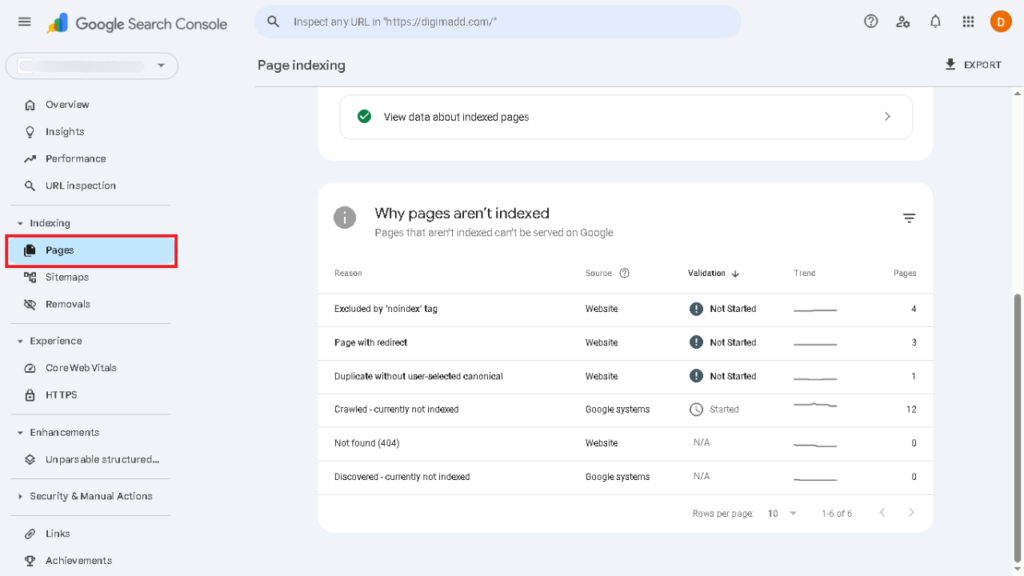
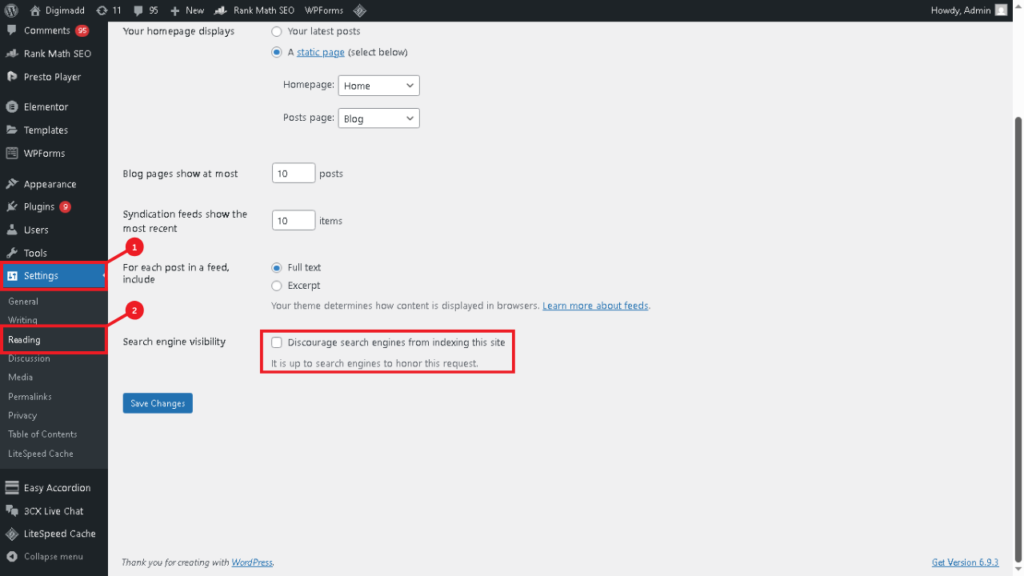
- If key pages aren’t showing up, check your CMS settings — a stray ‘noindex’ toggle is usually the culprit.
Submit Your Sitemap (Do It Once, Forget It)
Your sitemap is a map of your site — it tells Google and LLMs exactly what pages exist and where to find them. Most SEO plugins generate it automatically. You just need to tell Google where it is.
- Find your sitemap URL in your SEO plugin settings (usually yourdomain.com/sitemap.xml).
- Submit it in Search Console under Sitemaps.
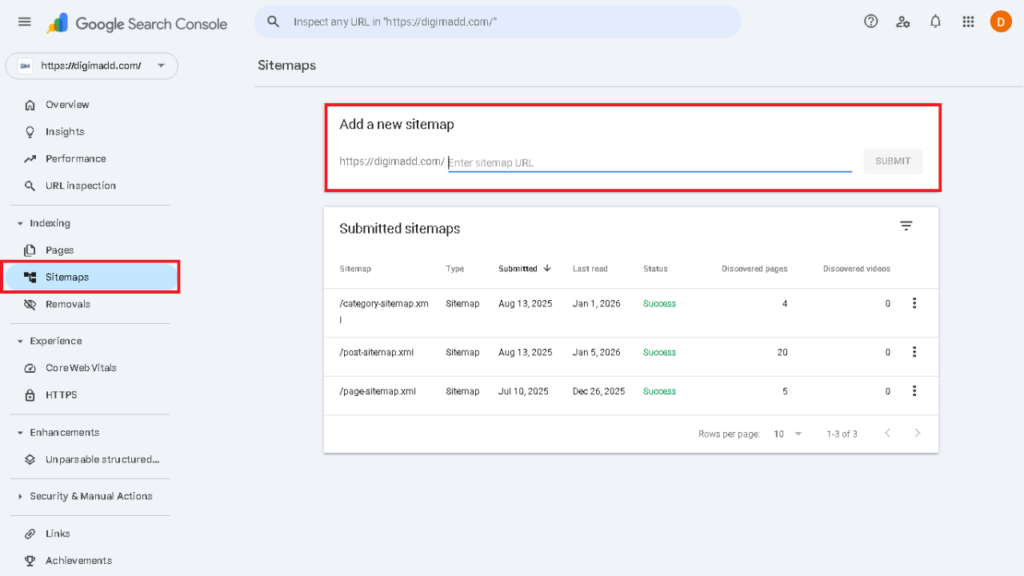
- Submit it once. Google re-reads it automatically as you publish new content.
Hunt Down Broken Links and Dead Pages
Broken links are quiet killers. Every 404 on a page that used to get traffic or had backlinks pointing at it is wasted authority. Google notices when your site is full of dead ends — and so do real visitors.
- Use a free crawler (Screaming Frog free version or a broken link checker plugin) to find all 404s.
- Redirect dead URLs to the most relevant live page — don’t just delete and move on.
- Pay extra attention to money pages and top-traffic posts — these hurt most when broken.
Get Your Titles and Meta Descriptions in Order
Title tags are the single strongest on-page signal you control. Yet most sites still have duplicate titles, missing titles, or titles stuffed with keywords that make no sense to an actual human.
- Every important page needs a unique title tag — no duplication.
- Include the primary keyword naturally — don’t force it.
- Write meta descriptions that reflect search intent — they don’t directly affect rankings but they do affect clicks.
Make Your Site Fast Enough (Not Perfect — Fast Enough)
Page speed is a confirmed ranking factor for Google. It’s also a user experience signal for LLMs that evaluate content quality. You don’t need a perfect Core Web Vitals score — you need to not be the slowest site in your niche.
- Run your homepage and a blog post through Google PageSpeed Insights.
- Compress images before uploading — this alone fixes most speed issues.
- Remove plugins and apps you’re not actively using — dead weight adds load time.
Test Your Site on a Phone — Right Now
Over 60% of web traffic is mobile. Google indexes the mobile version of your site first. If your mobile experience is broken, your rankings are broken — it’s that direct.
- Open your key pages on an actual phone — not just a resized browser window.
- Check that text is readable, buttons are tappable, and menus don’t break.
- Run Google’s Mobile-Friendly Test if you want confirmation with data.
Clean Up Your URL Structure
Messy URLs are confusing for both search engines and readers. A URL like /p=8734 tells no one what a page is about. A URL like /technical-seo-checklist does.
- Use short, descriptive slugs: /service-name not /service-name-v2-final-updated.
- Avoid dates in URLs unless you’re a news site — they make content look outdated fast.
- Pick one canonical version of your site (with or without www) and redirect the other — duplicate homepages split authority.
Build Internal Links Like a Librarian, Not a Robot
Internal links pass authority around your site and help Google (and LLMs) understand which pages matter most. They also keep visitors reading. Yet most sites treat internal linking as an afterthought.
- On every new post, add 3–5 links to related content — prioritise your main service or product pages.
- Use descriptive anchor text — ‘read our technical SEO guide’ beats ‘click here’ every time.
- Make sure no important page is ‘orphaned’ — every key page should have at least a few links pointing to it.
Add Basic Schema Without Writing a Line of Code
Schema markup is structured data that tells search engines exactly what your content is — an article, a product, an FAQ, a business. You don’t need to touch code for most of it.
- Enable Organization and Website schema through your SEO plugin — this one matters for LLMs identifying your brand as an entity.
- Add FAQ schema on pages that have actual visible FAQs — don’t fake it.
- Validate your schema using Google’s Rich Results Test before assuming it’s working.
Structure Your Pages So LLMs Can Extract Answers
This is the part most SEO checklists skip. Ranking on Google and ranking in AI search engines aren’t the same thing — but the good news is, what works for LLMs also works for traditional search.
LLMs pull from pages that are easy to read: clear headings, defined terms, and answers close to the question. If your content buries the answer in paragraph seven, it won’t get cited.
- Write H2s that match actual questions people ask — tools like AlsoAsked or AnswerThePublic help here.
- Add a short TL;DR and key definitions near the top of longer posts.
- Use bullet lists, numbered steps, and short sections — don’t write walls of text.
The Bottom Line
Most people overcomplicate technical SEO because the industry has spent years making it sound harder than it is. It isn’t.
Speed, indexability, and clarity beat every trick. Do this list once — properly — and then just maintain it monthly. The sites that rank consistently aren’t the ones with the most advanced technical setups. They’re the ones that stay clean, stay fast, and stay structured.
Technical SEO isn’t a growth strategy. It’s reputation insurance. Sort it out so nothing gets in the way of the work that actually moves the needle.

I’m Bulbul Gupta, Founder of Digimadd.com and an SEO Specialist with over 5+ years of experience helping businesses grow their organic traffic. Through this blog, I share practical insights on Digital Marketing to help my readers stay ahead in the online world. My goal is to simplify digital growth strategies for everyone.